Start Up For Newbies

Everything You Need To Start A Business

  • Home
  • Business Plans and Logos
    • How To Write A Business Plan
    • Biz Plan
    • Canva (for business logos)
    • Canva (for business plans)
    • Free Business Plan Software
    • Incorporate.com
    • Live Plan
    • Panda Doc
    • Wrike
  • Web Hosting Plans
    • Arvixe
    • Blue Host
    • Fat Cow
    • Green Geeks
    • Host Gator
    • iPage
    • Start Logic
    • Super Green Hosting
    • Web Hosting Hub
  • Premium WordPress Themes
    • DIY Themes
    • Elegant Themes
    • Square Space
    • Studio Press
    • Theme Forest
    • Woo Themes
    • Bizz Themes
    • Headway Themes
    • Viva Themes
  • Online Backup Storage
    • Apple iCloud
    • Carbonite
    • Drop Box
    • Google Drive
    • MyPCBackup
    • One Drive
  • Online Marketing
    • AWeber – Email Marketing
    • Bing Ads
    • Facebook Ads
    • Google Adwords
    • Keyword Discovery
  • About Us
You are here: Home / Archives for admin

Apple iCloud

By admin Leave a Comment

iCloud: Apple’s Cloud Storage Solution for All Your Devices

If you’re in the Apple ecosystem, iCloud is a natural choice for cloud storage and backup. Built right into iPhones, iPads, and Macs, iCloud makes it easy to keep your files, photos, and even device settings synced across all your Apple devices.

Here’s a look at what iCloud offers, its main features, pricing, and why it might be the perfect fit for Apple users.


What iCloud Offers

  1. Automatic Backup and Syncing: iCloud automatically backs up your photos, files, app data, and device settings, so if you lose or upgrade your device, you can restore it with just a few taps. It also keeps everything in sync across all your Apple devices, so you’ll always have your latest files on hand.
  2. iCloud Photos: With iCloud Photos, all your photos and videos are stored in full resolution in the cloud. This means you can access your photo library from any Apple device, without taking up tons of storage on each one.
  3. File Storage and Organization with iCloud Drive: iCloud Drive lets you store documents, PDFs, and other files in the cloud, making it easy to access and organize files from your Mac, iPhone, iPad, or even Windows PC.
  4. Collaboration in Real-Time: You can share files and folders and collaborate in real-time with others using iCloud, which is perfect for team projects or sharing files with family.
  5. Secure and Private Storage: iCloud is big on privacy, with end-to-end encryption for sensitive data, meaning only you can access your information. This is particularly great if you’re concerned about data security.

iCloud Pricing

Apple offers a few different iCloud+ plans depending on how much storage you need:

  1. 5GB Free: Comes with every Apple ID, great for a few photos and files, but you’ll likely need more space if you’re storing a lot.
  2. 50GB Plan: $0.99/month, good for casual users who need a little extra space.
  3. 200GB Plan: $2.99/month, ideal for families or those with a bigger photo library.
  4. 2TB Plan: $9.99/month, perfect for heavy users or families sharing a single plan.

Bonus: With an iCloud+ plan, you also get features like Hide My Email, custom email domains, and HomeKit Secure Video support.


Why iCloud is Great for Apple Users

  • Fully Integrated with Apple Devices: Since iCloud is built into iOS and macOS, it works seamlessly with Apple’s apps and services. Your photos, files, and backups are all right there without any extra setup.
  • Perfect for Photo Storage: iCloud Photos keeps your entire photo library in the cloud, freeing up space on your devices and making it easy to access photos from anywhere.
  • Easy Family Sharing: You can share your storage plan with up to five other family members, making it a cost-effective choice if you’ve got multiple Apple users in the house.
  • Automatic Device Backup: iCloud takes care of device backups automatically, so you don’t have to worry about losing your settings, photos, or messages if something happens to your phone.

A Few Things to Keep in Mind

  • Limited Free Storage: The 5GB free plan fills up fast, especially if you’re backing up photos or device data. Most people will need to upgrade to a paid plan eventually.
  • Not as Flexible for Non-Apple Devices: While you can access iCloud on a Windows PC, it’s definitely optimized for Apple devices, so it’s best for those fully in the Apple ecosystem.
  • No Extensive File-Sharing Options: While iCloud lets you share and collaborate, it doesn’t have the same depth of sharing tools as something like Dropbox or Google Drive.

How iCloud Stacks Up to Other Cloud Storage Options

  • Google Drive: Google Drive offers 15GB for free, and it’s great for sharing and collaboration across devices and platforms. But it doesn’t integrate as deeply with Apple devices as iCloud does.
  • OneDrive: Microsoft’s OneDrive has great integration with Office apps and offers 5GB of free storage. It’s ideal if you’re using both Apple and Windows devices but doesn’t have the same seamless photo and backup features as iCloud.
  • Dropbox: Dropbox is known for easy file sharing and collaboration, but it only offers 2GB for free, and paid plans can be more expensive than iCloud.

The Bottom Line: Is iCloud Right for You?

If you’re an Apple user, iCloud is a solid, seamless option for cloud storage and backup. It’s deeply integrated with Apple devices, so you don’t have to worry about compatibility issues, and it’s perfect for storing photos, files, and backups. The free plan is a little limited, but upgrading to a paid plan gives you plenty of storage at a reasonable price, plus extra privacy and sharing features with iCloud+.

Overall, iCloud is the go-to choice for Apple users who want cloud storage that works perfectly with their devices, keeps their data secure, and makes it easy to access files from anywhere.

Check out iCloud pricing plans to determine the best fit for you.
Filed Under: Online Backup ("Cloud")

Drop Box

By admin Leave a Comment

If you’re looking for an easy, reliable way to back up and store your files online, Dropbox is one of the best options out there. Since it launched, Dropbox has been a favorite for people who need cloud storage that’s simple, accessible, and full of features to keep files organized and safe. Here’s a rundown of what Dropbox offers, its main features, pricing, and why it might be a great fit for you.


What You Get with Dropbox

  1. File Backup and Syncing: Dropbox automatically syncs your files across all your devices – phone, tablet, computer – so your work and photos are always available and backed up. Any changes you make are saved and updated instantly on all connected devices.
  2. Easy File Sharing and Collaboration: One of the best parts of Dropbox is how easy it is to share files. You can share files or entire folders with a link, even if the other person doesn’t have a Dropbox account. It’s great for teamwork, especially if you’re collaborating on documents, designs, or big projects.
  3. File Recovery and Version History: Accidentally deleted a file or need an old version? Dropbox keeps file versions for up to 30 days (longer with some plans), so you can restore files or go back to an earlier version if you need to.
  4. Tons of Integrations: Dropbox plays well with tons of other apps, including Google Workspace, Microsoft Office, Slack, Zoom, and more. This means you can use Dropbox as a central hub for all your documents, files, and collaboration.
  5. Mobile and Desktop Apps: Dropbox’s apps for mobile and desktop make it super easy to access your files anywhere. You can even set it up to automatically back up photos and videos from your phone, which is a huge time-saver.

Dropbox Pricing

Dropbox has a few different plans depending on your storage and collaboration needs:

  1. Basic Plan: Free, with 2GB of storage. Perfect for light users or people who just want to test it out.
  2. Plus Plan: $11.99/month for 2TB of storage. Good if you need more space for personal use or backup.
  3. Family Plan: $19.99/month for 2TB, shared among up to six people.
  4. Professional Plan: $19.99/month for individuals needing 3TB, plus advanced sharing controls and file recovery.
  5. Business Plans: Starting at $15/user per month, these are packed with additional admin controls and more storage, ideal for teams and businesses.

Why Dropbox is Great for Backup and Storage

  • Super Easy to Use: Dropbox is designed for everyone – whether you’re tech-savvy or not. Drag-and-drop file storage, automatic syncing, and simple sharing links make it user-friendly.
  • Secure Storage: Dropbox takes security seriously with features like two-step verification and encryption, so you know your files are safe.
  • Access Anywhere: Since it’s cloud-based, you can get to your files from pretty much any device with internet access.
  • Collaboration-Friendly: Dropbox is a huge help for projects with multiple people. You can comment on files, tag people, and work together easily without tons of email attachments.

A Few Things to Keep in Mind

  • Storage Limits on Free Plans: The Basic (free) plan only gives you 2GB, which is enough for smaller files but fills up quickly if you’re storing photos, videos, or lots of documents.
  • Cost for Higher Storage: Dropbox’s paid plans aren’t the cheapest, so if you’re just looking for a place to store tons of data on a budget, it’s worth comparing it to Google Drive or OneDrive.
  • No Built-in Document Editing: While Dropbox integrates with tools like Google Workspace and Office, it doesn’t have built-in editors. You’ll need to open files in another app to make changes.

How Dropbox Compares to Other Storage Options

  • Google Drive: Google Drive is another popular option with 15GB of free storage and great integration with Google Workspace. It’s perfect if you’re already using Gmail and Google Docs but doesn’t offer as many recovery and versioning options as Dropbox.
  • OneDrive: Microsoft’s OneDrive offers solid integration with Office apps and is especially good for people who use Windows. You get 5GB for free, and paid plans are a bit cheaper, though it may not be as streamlined for collaboration as Dropbox.
  • iCloud: If you’re fully in the Apple ecosystem, iCloud is super convenient, but it’s not as versatile for sharing and collaboration as Dropbox.

The Bottom Line: Is Dropbox Right for You?

Dropbox is a solid choice for anyone needing reliable, easy-to-use cloud storage and file backup. It’s simple to set up, offers great sharing features, and works with tons of popular apps, which makes it perfect for students, professionals, and teams. If you’re all about accessibility, security, and collaboration, Dropbox is definitely worth checking out.

Visit Dropbox here to try it out for yourself. Don’t wait until it’s too late and you lose valuable data, photos, and videos.

Disclosure: We are a student owned and operated review site that receives compensation from the companies whose products we review. We have researched products online and give high marks based on this research to only the very best. We are independently owned and the opinions expressed here are our own.

Filed Under: Uncategorized

Google Drive

By admin Leave a Comment

Disclosure: We are a student owned and operated review site that receives compensation from the companies whose products we review. We have researched products online and give high marks based on this research to only the very best. We are independently owned and the opinions expressed here are our own.

Google Drive: Your All-In-One Solution for Cloud Storage and Collaboration

If you’re looking for a versatile, user-friendly online storage option, Google Drive is one of the best choices out there. It’s built right into the Google ecosystem, so if you already use Gmail, Google Docs, or YouTube, it’s super easy to get started with Google Drive. Here’s a breakdown of what Google Drive offers, its main features, pricing, and why it might be the perfect cloud storage solution for you.


What You Get with Google Drive

  1. Generous Free Storage: Google Drive gives you 15GB of free storage right out of the gate. This storage is shared across your Google services (Drive, Gmail, Photos), so it’s perfect for storing files, backing up emails, and saving photos.
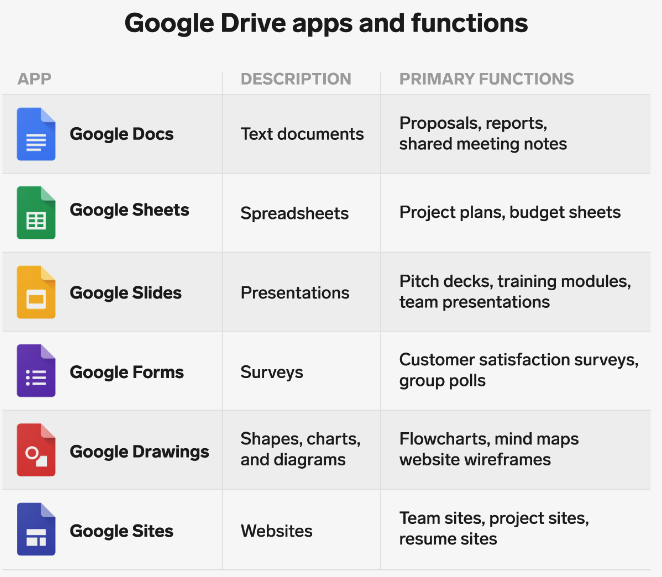
  2. Seamless Integration with Google Workspace: Since it’s part of the Google family, Google Drive integrates effortlessly with Google Docs, Sheets, Slides, and more. You can create, edit, and save documents directly in Drive, which is super convenient for anyone who needs easy-to-use tools without downloading software.
  3. File Sharing and Collaboration: Google Drive makes it simple to share files with just a few clicks. You can choose who gets access, decide if they can view or edit, and collaborate in real time. It’s awesome for group projects, work documents, or any files you need to share and work on with others.
  4. Multi-Device Syncing: Access your files from any device – phone, tablet, computer – with Google’s Drive app. This syncs your files automatically so you’re always working with the latest version, no matter where you’re logged in.
  5. Powerful Search: Google Drive uses Google’s search tech, so finding files is super fast. You can search by file type, keywords within documents, or even by who you’ve shared it with.

Google Drive Pricing

While Google Drive’s free plan is generous, you might eventually need more space. Here’s a look at the options with Google One (Google’s paid storage plan):

  1. 15GB – Free (good for personal use or storing smaller files)
  2. 100GB – $1.99/month (great for those with lots of photos, videos, or work files)
  3. 200GB – $2.99/month (perfect for family sharing or small businesses)
  4. 2TB – $9.99/month (ideal for heavy users or those needing more robust storage)

Why Google Drive is Awesome for Storage and Collaboration

  • Easy to Use: Google Drive’s simple interface makes it a breeze to navigate, even if you’re not tech-savvy. You can easily drag and drop files, organize folders, and find everything quickly.
  • Built for Collaboration: Google Drive’s real-time collaboration tools mean you and your team can work on documents simultaneously. You can leave comments, track edits, and view revision history, making it perfect for both work and school projects.
  • High Security Standards: Google Drive is secure, with built-in protections against malware and phishing, plus two-factor authentication for your account.
  • Access from Anywhere: Whether you’re on a computer, Android, or iOS device, Google Drive’s apps make accessing and managing your files easy. It’s a perfect solution if you’re working remotely or need to stay connected on the go.

A Few Things to Keep in Mind

  • Shared Storage: The 15GB free storage is shared across Google services (Drive, Gmail, Photos), so if you get a lot of emails with attachments or upload a lot of photos, you might run out of space quickly.
  • Limited File Organization: Google Drive’s organization can feel basic if you’re used to detailed folder structures, though you can add color-coded folders and stars to keep important files easy to spot.
  • Less Support for Non-Google Files: While Drive supports tons of file types, it’s definitely optimized for Google Docs, Sheets, and Slides. Working with other file formats may be less seamless.

How Google Drive Compares to Other Cloud Storage

  • Dropbox: Dropbox is great for syncing and sharing, and it offers more advanced collaboration features. However, its free plan only gives you 2GB, so it’s not as generous as Google Drive.
  • OneDrive: Microsoft’s OneDrive is ideal if you use Office regularly, with 5GB of free storage and deeper integration with Office tools like Word and Excel. But Google Drive has the edge if you prefer Google’s cloud-based Office suite.
  • iCloud: If you’re an Apple user, iCloud is super convenient, but it doesn’t offer as many sharing and collaboration tools as Google Drive. It’s also better suited for photos and iOS backups.

The Bottom Line: Is Google Drive Right for You?

If you’re looking for easy-to-use, reliable cloud storage with plenty of free space and amazing collaboration tools, Google Drive is a top choice. It’s ideal if you’re already in the Google ecosystem, whether you’re storing files, working on shared documents, or backing up important photos.

For anyone needing a mix of storage and collaboration without the fuss of additional software, Google Drive offers a great balance of functionality, flexibility, and affordability.

Click here to test out Google Drive today.

Filed Under: Online Backup ("Cloud")

One Drive

By admin Leave a Comment

OneDrive: Cloud Storage and Backup with Microsoft Power

If you’re already using Microsoft or just want a solid cloud backup and storage option, OneDrive is a great pick. It is Microsoft’s answer to cloud storage, and it works perfectly with Windows and Office apps like Word, Excel, and PowerPoint. Whether you’re saving photos, backing up important files, or sharing documents with friends or coworkers, OneDrive keeps things easy and secure.

Here’s everything you need to know.


What OneDrive Offers

  1. Seamless Windows and Office Integration: If you use Windows or Microsoft Office, OneDrive is built right into the system. You can save documents directly to OneDrive from apps like Word and Excel, and everything syncs automatically.
  2. Easy File Backup and Sync: OneDrive keeps all your files backed up and synced across your devices, so whether you’re on your computer, phone, or tablet, your files are always up to date.
  3. File Sharing and Collaboration: Share files or folders with a link, and decide if people can edit or just view. This is great for group projects, work files, or even just sharing photos with friends and family.
  4. Built-in Security: OneDrive comes with multiple security features, including two-factor authentication and file encryption, so your files are well-protected. You also get “Personal Vault,” a secure space for sensitive files that requires extra verification to access.
  5. Access on Any Device: OneDrive has apps for Windows, Mac, iOS, and Android, so you can access your files from just about anywhere.

OneDrive Pricing

OneDrive offers a decent amount of storage for free, and you can bump up to larger plans if you need more space:

  1. 5GB Free: A solid amount of free storage, enough for a few documents and smaller files.
  2. 100GB Plan: $1.99/month for more storage if you’re just looking to save a few larger files.
  3. Microsoft 365 Personal: $6.99/month for 1TB of storage, plus access to Microsoft Office apps like Word, Excel, and PowerPoint.
  4. Microsoft 365 Family: $9.99/month for 6TB (1TB per person for up to 6 people), along with Office apps – perfect if you want to share with family or roommates.

Why OneDrive is Awesome for Backup and Storage

  • Perfect for Microsoft Users: If you’re on a Windows computer or use Office a lot, OneDrive feels like an extension of your desktop. It’s built into Windows 10 and 11, so you don’t have to download anything extra.
  • Great Value with Microsoft 365: When you get OneDrive with a Microsoft 365 plan, you’re also getting full versions of Office apps like Word and Excel, so it’s more than just cloud storage.
  • File Versioning and Recovery: If you mess up a file or delete something accidentally, OneDrive keeps versions for 30 days so you can restore it.
  • Secure with Personal Vault: OneDrive’s Personal Vault is perfect for important files like IDs, tax docs, or other sensitive stuff that you want to keep extra safe.

Things to Keep in Mind

  • Free Storage is Limited: The 5GB free plan is a good start, but if you have lots of photos, videos, or large files, you might run out of space quickly.
  • Works Best with Microsoft Apps: While OneDrive works on all major devices, it’s definitely optimized for Microsoft products. If you’re mainly on Apple or Google platforms, you might find iCloud or Google Drive more seamless.
  • Offline Access Setup: You can work on files offline, but you’ll need to set up specific files or folders for offline access first, so it’s something to plan ahead if you’re traveling or without Wi-Fi.

How OneDrive Stacks Up to Other Cloud Storage Options

  • Google Drive: Google Drive gives you 15GB for free and integrates well with Google’s productivity apps (Docs, Sheets, etc.), so it’s a solid choice if you’re deep in the Google ecosystem.
  • Dropbox: Dropbox is great for easy sharing and collaboration, and it has a super simple interface. But it only gives you 2GB for free, so you’ll likely need to upgrade if you want more storage.
  • iCloud: If you’re an Apple user, iCloud is a great option for photos, files, and device backups. But it doesn’t have the same file-sharing flexibility as OneDrive and can be trickier to use on non-Apple devices.

The Bottom Line: Is OneDrive Right for You?

OneDrive is an awesome choice if you’re a Windows user or big on Microsoft Office apps. It’s built right into the system, easy to use, and comes with great security and sharing options. Plus, if you go with a Microsoft 365 plan, you get tons of storage plus access to Word, Excel, and other apps, making it a great value.

If you’re all about Microsoft or just want reliable, secure cloud storage that’s easy to manage, OneDrive is definitely worth checking out. Whether you’re backing up files, working on a group project, or just want access to your documents from anywhere, OneDrive has you covered.

Filed Under: Online Backup ("Cloud")

Online Marketing (Home Page Post)

By admin Leave a Comment

Google, Bing, Facebook, and Doubleclick are just handful of networks you can work with to drive traffic to your website.  Which is best for newbies and what places should you target to take your web business to the next level.  Check out our Online Marketing section to learn more.

Filed Under: Home Page Online Marketing Tagged With: online marketing

WordPress Themes (Home Page Post)

By admin Leave a Comment

If you’re using WordPress, stop spending thousands of $$$ on graphic designers.  See what premium WordPress Themes can do for you.  Priced anywhere from $20/theme to an all-inclusive price of $250.  Whichever route you choose, it’s certainly cheaper than hiring a designer. Save money, take control.

Filed Under: Home Page Wordpress Theme Tagged With: wordpress themes

Web Hosting Plans (Home Page Post)

By admin Leave a Comment

We’ve researched hundreds of web hosting companies and parsed it down to the top 10-12.  As a fellow Internet entrepreneur, we know how valuable your time is so rather than spending hours sifting through all the information yourself, here is our review of the best web hosting services.

Filed Under: Home Page Web Hosting Tagged With: web hosting

Still Looking For a Domain Name?

By admin Leave a Comment

Mostly known by non-Internet folks for its Super Bowl commercials, GoDaddy.com is known within the industry as one of the leading domain registrars.  Use GoDaddy’s domain suggestion tool to help find the domain URL that’s right for you.  Then register your domain and you’re ready to go.

Filed Under: Web Hosting Tagged With: domain name, web hosting

Find The Right Keywords To Target

By admin Leave a Comment

One great way to get people through your site is through Search Engine Marketing.  Companies such as Google Adwords and Bing lead the way in search marketing.  But you still need to know what keywords to target and one awesome tool to use is Keyword Discovery.

Filed Under: Uncategorized Tagged With: keyword tool, online marketing, search engine marketing

Google Adwords – Get Sales Today

By admin Leave a Comment

A website does you no good if nobody knows about it.  That’s where Google Adwords comes into play.  Once you’ve decided on your domain name, a web hosting plan, a premium WordPress Theme, and completed your website design, the next step is finding customers for your site.  One of the most prominent ways to start getting traffic to your website is through Google Adwords pay-per-click advertising model.  Google Adwords combines search engine marketing, content delivery, display and banner advertising, video/mobile ads, and other innovative ways to get people to your website.

Filed Under: Online Marketing Tagged With: google adwords, online marketing
« Previous Page
Next Page »
  • Arvixe
  • Bizz Themes
  • Blue Host
  • Carbonite
  • DIY Themes
  • Elegant Themes
  • Fat Cow
  • Green Geeks
  • Host Gator
  • iPage
  • Headway Themes
  • Canva (for business logos)
  • Canva (for business plans)
  • MyPCBackup
  • Square Space
  • Start Logic
  • Studio Press
  • Super Green Hosting
  • Theme Forest
  • Web Hosting Hub
  • Woo Themes
  • Viva Themes
  • AWeber – Email Marketing
  • Bing Ads
  • Facebook Ads
  • Google Adwords
  • Keyword Discovery
  • American Express Business
  • Chase Ink for Business
  • Incorporate.com
  • Legal Zoom
  • Phone Sheriff
  • Prosper – Personal Loans
  • Revisitors.com
  • Biz Plan
  • Free Business Plan Software
  • How To Write A Business Plan
  • Getting Your Creative Juices Flowing
  • User Generated Content (UGC)
  • Live Plan
  • Panda Doc
  • Wrike
  • Drop Box
  • Google Drive
  • One Drive

Return to top of page

Copyright © 2026 StartUpForNewbies · Web Hosting · Premium Wordpress Themes · Business Services